
Audit log
The audit log answers questions after the fact. Who removed that person? When did sharing change on that project? Which admin rotated the encryption key? Who was signing in from that address?
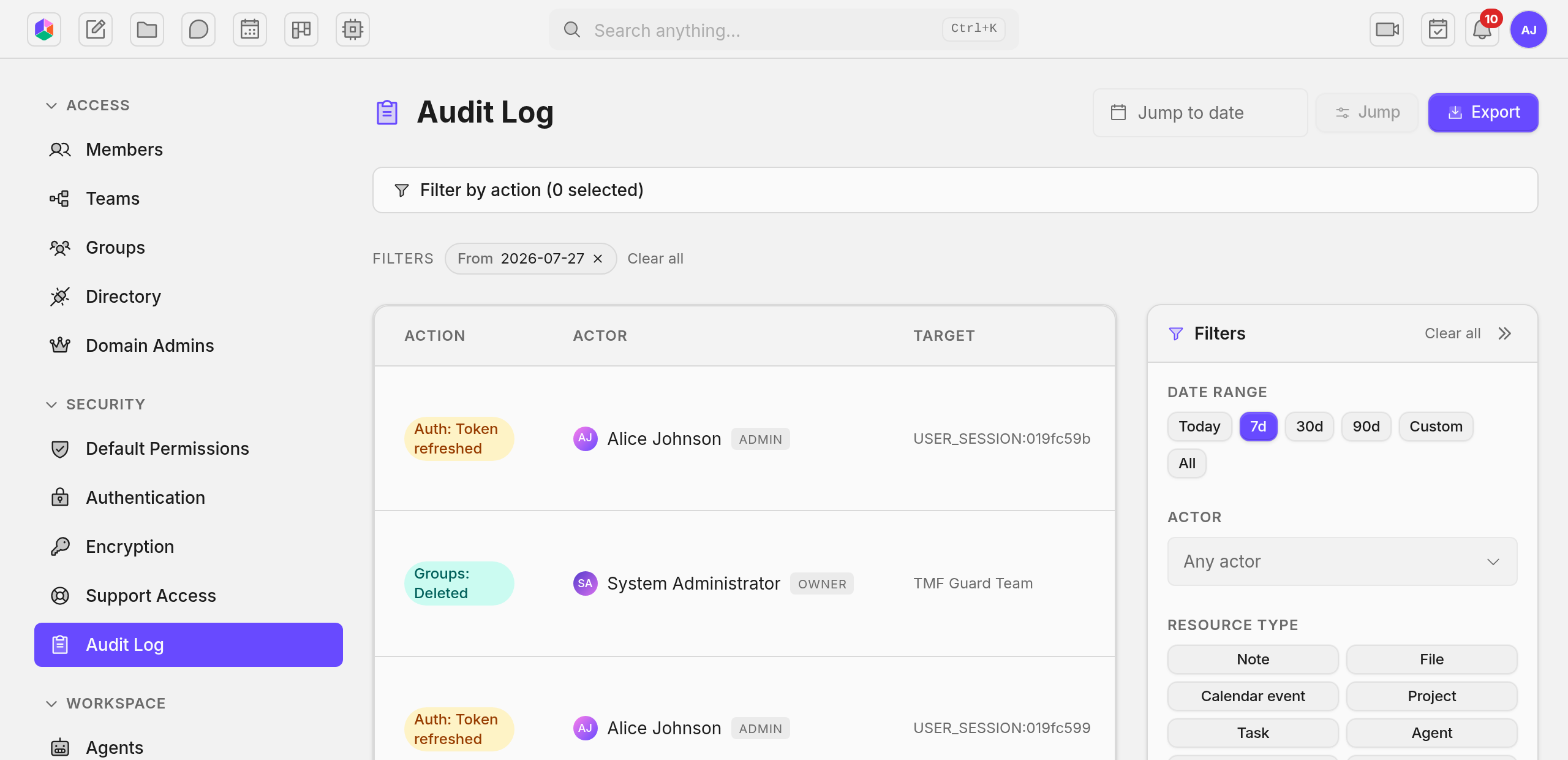
Owners and admins read it. A regular member sees nothing here, not even entries about their own activity.
No one can edit or delete an entry, owners and admins included. Once something is recorded it stays recorded.
What each entry shows
Section titled “What each entry shows”Who did it, what they did, what they did it to, and when.
Alongside that, the entry keeps the person’s role at the moment they acted. If you demote someone next month, the log still shows they were an admin when they made that change.
Entries also record the IP address and the browser or app the action came from, which is what you want when you are investigating a login you do not recognize.
Where a change has a before and after, both are kept. A role change shows the old role and the new one. A sharing change shows what the access was and what it became.
When someone acts on behalf of another person, both names appear. When Uniffy support is working in your organization under a support session you approved, their entries are marked as theirs, so operator activity is never mixed in with your own admins.
What Uniffy never records
Section titled “What Uniffy never records”What people read. Opening a note or viewing a file is not recorded. The log is not a surveillance tool and we will not turn it into one.
What people write. The log records that a channel was created, or that an admin deleted a message. It never stores the message.
Secrets. Provider keys and integration credentials appear as a fingerprint or a hint, never as the value. Someone reading your audit log cannot lift a key out of it.
Who joined a call. Attendance lives with the call itself, so the log carries only the call starting, ending, and moderation.
File uploads, unless you ask for them. One entry per upload is a lot of volume, so it is off by default. Your operator can turn it on when you need upload attribution.
Finding something
Section titled “Finding something”Filters combine. Narrow by person, by one or more events, by the kind of thing that was touched, and by a time range with quick picks for today, 7, 30 and 90 days plus a custom window.
To follow one thing rather than one person, paste its link or id into the resource field. That gives you the full history of a single note, file, channel or agent.
Exporting
Section titled “Exporting”Export whatever your filters currently show, as CSV or JSON. Each row carries the timestamp, the person and their email and role, the event, the thing it touched, the IP address, the browser, and the before and after values.
An export is capped at one million entries. If your filter matches more than that you are told immediately, before anything downloads, so you can narrow the range and try again.
How long entries are kept
Section titled “How long entries are kept”Forever. Nothing is deleted on a schedule and there is no retention setting to configure.
That is the right default for an audit trail, and it does mean the log only grows. If you run a large organization, mention it to whoever sizes your storage.
Every event we record
Section titled “Every event we record”These are the groupings you see under Filter by action. A handful of the events below are recorded but do not yet appear in that dropdown. They still show up in the log and in exports, and they are marked here.
Authentication
Section titled “Authentication”| Event | Recorded when |
|---|---|
| Login success | Someone signs in |
| Login failure | A sign in attempt fails |
| Login rate limited | Too many attempts, so further tries are refused |
| Token refreshed | A session renews itself. Kept to at most one entry per person per hour so it cannot bury the log |
| Token revoked | A session token is invalidated |
| Session terminated | A session is ended |
| Password changed | Someone changes their own password |
| Password reset requested | A reset link is asked for |
| Password reset completed | A reset link is used |
| Password reset blocked | A reset is refused |
| Registration rejected | A sign up is turned away, for example when public registration is off |
| Registration succeeded | A new account is created. Not in the filter dropdown yet |
| Invitation accepted | An invited person finishes signing up |
| Refresh token reuse detected | A session token is replayed after it was already used, which can mean a stolen session. Worth investigating. Not in the filter dropdown yet |
Two factor authentication
Section titled “Two factor authentication”| Event | Recorded when |
|---|---|
| MFA enrollment started | Someone begins setting up two factor |
| MFA enrolled | Setup completes and two factor is on |
| MFA verified | A code is accepted at sign in |
| MFA verify failed | A code is rejected |
| MFA recovery code used | A recovery code is spent instead of a code |
| MFA recovery codes regenerated | A fresh set of recovery codes is issued |
| MFA disabled | Two factor is turned off |
| MFA policy changed | You change whether two factor is required |
| MFA reset by org admin | An admin clears someone’s two factor so they can enroll again |
| MFA reset by platform admin | The operator clears it |
| MFA platform reset requested | An operator reset is asked for |
| MFA platform reset approved | That request is approved |
| MFA break-glass reset | The emergency command line reset is used, for a self hosted deployment locked out of its own admin |
People and membership
Section titled “People and membership”| Event | Recorded when |
|---|---|
| Member invited | You send an invitation |
| Invitation revoked | You cancel a pending invitation |
| Invitation resent | You issue a fresh link |
| Member added via invite | An invitation is accepted and the membership exists |
| Member added | Someone is added directly, without an invitation |
| Member role changed | Admin or Member changes on the roster |
| Member removed | Someone loses access to the organization |
| Invited | A user account is invited into the deployment |
| Activated | A deactivated account is switched back on |
| Deactivated | An account is switched off everywhere |
| Email changed | An account’s address changes |
| Avatar changed | An account picture changes |
| Deleted | A user account is deleted |
| Force logout | Every session for an account is killed |
| System admin granted | Operator rights are given |
| System admin revoked | Operator rights are taken away |
| Profile updated | An admin edits someone’s job title, department or office. Not in the filter dropdown yet |
| Manager changed | Someone’s manager changes on the org chart. Not in the filter dropdown yet |
Teams, groups and admin scopes
Section titled “Teams, groups and admin scopes”| Event | Recorded when |
|---|---|
| Group created | A team or access group is created |
| Group updated | Its name, kind, lead or parent changes |
| Group deleted | It is removed |
| Group member added | Someone joins it |
| Group member removed | Someone leaves it |
| Group member role changed | Their role inside it changes. Not in the filter dropdown yet |
| Team lead changed | A team gets a new lead. Not in the filter dropdown yet |
| Team parent changed | A team moves under a different parent. Not in the filter dropdown yet |
| Domain admin granted | Someone gets admin rights over one feature area |
| Domain admin revoked | Those rights are taken away |
If you sync people from a company directory, those events are recorded too: identity source created, updated, deleted, and sync completed. None of them are in the filter dropdown yet.
Sharing
Section titled “Sharing”Every change to who can reach a specific note, file, project or any other item.
| Event | Recorded when |
|---|---|
| Member added | A person or group is given access to an item |
| Member role changed | Their role on that item changes |
| Member removed | Their access is taken away |
| Access mode changed | The item switches between owner only, invited people, and everyone in the org |
| Baseline role changed | The role everyone in the org inherits on that item changes |
| Ownership transferred | The item gets a new owner |
Content
Section titled “Content”The same four events cover notes, files, calendar events and tasks.
| Event | Recorded when |
|---|---|
| Deleted | The item goes to trash |
| Restored | It comes back out of trash |
| Permanently deleted | It is destroyed for good |
| Moved | It changes folder or parent |
Projects add Archived and Unarchived, and Exported each time someone downloads a project’s tasks as a CSV or a bundle. Files add Uploaded, which is off unless your operator turns it on, and Version restored when an older version of a file is put back. Version restored is not in the filter dropdown yet.
| Event | Recorded when |
|---|---|
| Channel created | A channel is created |
| Channel updated | Its name, topic or settings change |
| Channel archived | It is archived |
| Channel unarchived | It is brought back |
| Channel deleted | It is deleted |
| Channel member added | Someone joins |
| Channel member removed | Someone leaves |
| Channel member kicked | A moderator removes someone |
| Channel member role changed | Someone is promoted or demoted inside a channel. Not in the filter dropdown yet |
| Message deleted by admin | A moderator deletes someone else’s message |
| Event | Recorded when |
|---|---|
| Started | A call begins |
| Ended | A call finishes |
| Participant kicked | Someone is removed from a call |
| Participant muted | Someone is muted by a moderator |
| Event | Recorded when |
|---|---|
| Created | A room is added |
| Updated | Its details change |
| Archived | It is taken out of circulation |
| Deleted | It is removed |
Agents
Section titled “Agents”| Event | Recorded when |
|---|---|
| Created, Updated, Deleted, Cloned | An agent changes |
| Skill created, updated, deleted | A skill changes |
| Skill enabled, disabled | A skill is switched on or off for an agent |
| Provider key added, rotated, deleted, toggled | An AI provider key changes. The key itself is never recorded |
| Budget created, updated, deleted | An organization spend limit changes |
| User quota created, updated, deleted | A per person spend cap changes |
| Rate limit created, updated, deleted | A usage rate limit changes |
| Currency rate upserted, deleted | An exchange rate for cost reporting changes |
| Display currency set | The currency costs are shown in changes |
| Image generation | An agent generates an image |
| Runtime settings updated | The organization’s agent runtime settings change. Not in the filter dropdown yet |
Every tool an agent runs is recorded too, named after the tool it called.
Integrations
Section titled “Integrations”None of these are in the filter dropdown yet. They are still in the log and in exports.
| Event | Recorded when |
|---|---|
| Connection added | An external service is connected |
| Connection updated | Its settings change |
| Connection removed | It is disconnected |
| Connection toggled | It is switched on or off |
Credentials appear as a hint, never as the value.
| Event | Recorded when |
|---|---|
| Sent | Uniffy sends a message |
| Send failed | Sending fails |
| Suppressed | An address is blocked after bouncing or a complaint |
| Suppression removed | You unblock an address |
| Config updated | Your mail settings change |
| Config cleared | Your mail settings are removed |
| Config force-cleared by platform | The operator clears them |
| System config updated | The deployment wide mail settings change |
| System config cleared | Those are removed |
Organization and security settings
Section titled “Organization and security settings”| Event | Recorded when |
|---|---|
| Organization created | The organization is created |
| Settings changed | General organization settings change |
| Security settings changed | Security settings change |
| Permission defaults changed | The defaults for new content change |
| Encryption key rotated | Your organization’s encryption key is rotated |
| Public registration changed | The deployment turns open sign up on or off |
| Deployment encryption rotated | The deployment master key is rotated |
Support sessions
Section titled “Support sessions”Only relevant on cloud, where a Uniffy operator needs your approval to reach anything.
| Event | Recorded when |
|---|---|
| Requested by operator | An operator asks for access |
| Approved by owner | You grant it |
| Rejected by owner | You refuse it |
| Started | The approved session begins |
| Revoked | You cut it short |
| Expired | It runs out on its own |
| Consent mode changed | You change how these requests are handled |
| Decrypt bridge attempt | An attempt is made to reach encrypted data through a session |
Organization lifecycle
Section titled “Organization lifecycle”| Event | Recorded when |
|---|---|
| Suspended by platform | The operator suspends the organization |
| Unsuspended by platform | The suspension is lifted |
| Deleted, Deleted by platform | The organization is deleted |
| Restored by platform | A deleted organization is brought back |
| Purge warning sent | Notice that permanent deletion is coming |
| Purged | The organization and its data are destroyed for good |
See also
Section titled “See also”- Access and privacy: what an admin can and cannot see.
- Members: the membership actions that land here.