
Manage members and invitations
On the Members page you decide who reaches your organization and what they can do once they are in. Owners and admins can open it. Members cannot.
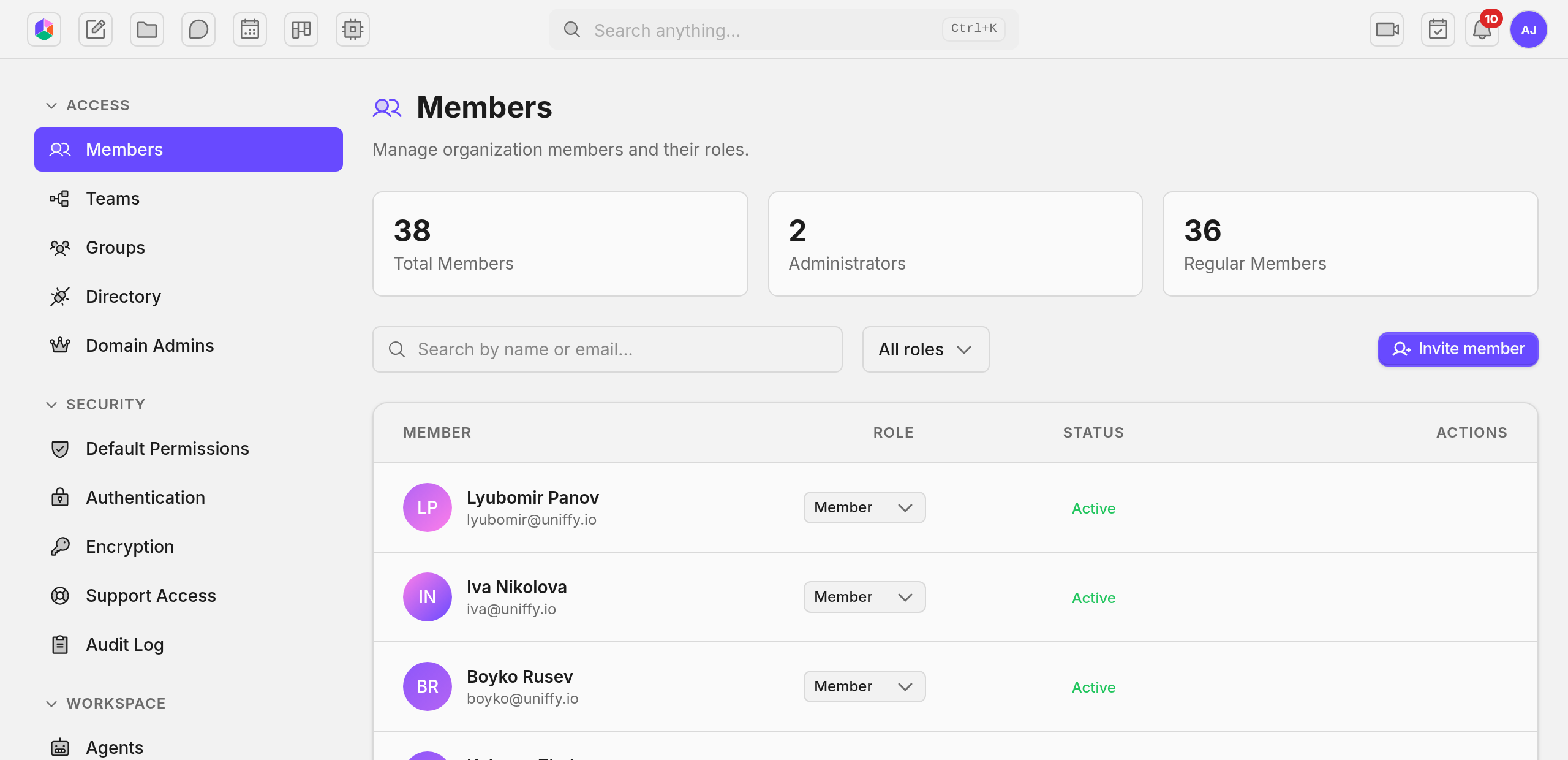
Search and the role filter both run as server queries, so they cover every member in the org rather than the rows already loaded.
Limits that hold even for admins
Section titled “Limits that hold even for admins”You cannot change your own role. Have another admin make the change.
You cannot remove the owner, and the owner badge is read only. Ownership moves through Transfer ownership on the Authentication page, never through the role dropdown.
Admin and Member are the only roles you assign here. A change applies immediately, with no confirmation step.
Promoting someone to admin gives them everything you have. There is no limited admin tier. When you want to hand out a narrower scope, use domain admins instead.
Removing someone
Section titled “Removing someone”Removal takes away their access to this organization and nothing else. They keep their Uniffy account.
Content they created stays with the organization. Ownership does not fall back to anyone, so nothing is orphaned and nothing is deleted.
Inactive accounts
Section titled “Inactive accounts”An account reads Inactive when a platform operator deactivates it. That is a different thing from removing a member, and you do not trigger it from this page.
The row stays in the roster either way, so the audit trail stays intact.
Agent spend quotas
Section titled “Agent spend quotas”Each member can carry a monthly cap on agent spend, counted across every agent in the organization rather than per agent.
The cap is enforced on the server, so it holds no matter which client they use. Quotas need agents enabled for the org first.
Invalidating a member’s caches
Section titled “Invalidating a member’s caches”Invalidating caches forces that member’s app to drop everything it has cached and reload from the server on its next request. Reach for it when someone reports stale data after a large change.
Inviting
Section titled “Inviting”An invitation carries an email address and the role the person joins with.
It goes out through whatever mail configuration is active. Yours if you set one up, the deployment default otherwise. See Email for how that resolves.
When no mail is configured at all, the invitation is still created. You copy the link and deliver it yourself.
Invitations expire on a window the deployment sets. The default is 7 days.
Invitations after they go out
Section titled “Invitations after they go out”Every invitation is pending, accepted, expired, or revoked.
Revoke kills a pending invitation immediately. Resend issues a fresh link with a new expiry and sends it again, and it works on expired invitations as well as pending ones.
Accepted invitations stay for the record. You cannot revoke one to undo a membership. Remove the member instead.
What lands in the audit log
Section titled “What lands in the audit log”Every change here writes an audit row. Search the Audit Log by action name.
| Action | When it fires |
|---|---|
organization.member_added |
A direct add, which is rare. Invitations are the normal path. |
organization.member_added_via_invite |
An invitation is accepted and the membership is created |
organization.member_role_changed |
A role changes |
organization.member_removed |
A removal is confirmed |
organization.member_invited |
A new invitation is created |
organization.invitation_revoked |
A pending invitation is cancelled |
organization.invitation_resent |
A new link is generated and the email is sent again |
Each row records who acted, the target user or email, the old and new role where that applies, and the timestamp.
Troubleshooting
Section titled “Troubleshooting”The invitation email never arrived. Open the Email page and look at Deliveries. If the row shows bounced or complained, that address is suppressed and Uniffy will not retry it. Fix the problem at the source, clear the suppression, then resend.
A removed member still shows up in @ mentions or shares. Caches lag for a few seconds. If it sticks, invalidate caches on any device still seeing them.
The quota dialog will not open. Quotas need agents turned on for the org. Open the Agents page first.
See also
Section titled “See also”- Groups: bundle members for permission grants.
- Domain Admins: narrower admin scopes per feature area.
- Default Permissions: what new content inherits when a member creates it.
- Audit Log: the full event history for member changes.